
Advanced Debugging for Web Developers
Overview
DevTools Pro is a desktop application designed to assist developers in identifying and resolving issues within web applications. The software enables precise control over browser behavior during development and testing phases. Users can pause execution at specific points, such as when a page scrolls, when a cookie is accessed, or when an alert box appears. This functionality supports real-time inspection and troubleshooting of dynamic web content.
It is tailored for professional developers and advanced users engaged in web development, testing, and quality assurance. The tool helps streamline the debugging process by allowing developers to monitor changes in object properties and trigger actions based on specific events. This capability is particularly useful when testing complex user interactions or validating state management logic in single-page applications.
The developer, DevTools Pro, has not provided additional background information. However, the software’s focus on precise debugging suggests a targeted approach to improving development efficiency. Real-world usage scenarios include identifying timing issues in asynchronous operations, validating event handling, and verifying data flow in responsive interfaces.
Key Features & Capabilities
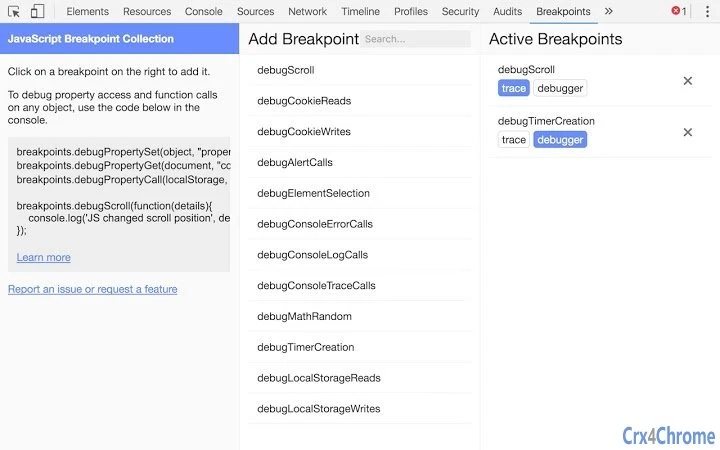
- Break on Scroll – Pause execution when a user scrolls through a web page, enabling inspection of DOM state and scroll-related logic.
- Break on Cookie Access – Trigger a pause when a script attempts to read or write cookies, helping to track session management and authentication flows.
- Break on Alert Box – Stop execution when an alert dialog is shown, useful for debugging unexpected user notifications or error messages.
- Property Change Monitoring – Detect changes to any property on an arbitrary object, aiding in the tracking of state updates in JavaScript applications.
- Trace Messages – Instead of pausing, display real-time trace outputs to log events without interrupting execution.
These features are ideal for developers working on dynamic, interactive web applications. For example, a developer can use the property change monitor to detect when a user’s session token is updated, ensuring proper security handling. Similarly, the scroll break feature can help verify that lazy-loading components are triggered at the correct scroll positions.
By offering both pause and trace functionalities, the tool supports flexible debugging workflows. Developers can choose to halt execution for detailed inspection or continue running while logging key events. This dual approach enhances both precision and efficiency during development cycles.
User Interface, Workflow & Performance
The user interface of DevTools Pro is designed to be minimal and functional, focusing on core debugging operations. Navigation is straightforward, with clear access to breakpoint settings and trace configuration. The layout prioritizes usability, allowing developers to quickly configure conditions without navigating through multiple menus.
Workflow efficiency is enhanced by the tool’s direct integration with browser environments. Users can enable or disable breakpoints with a single action, and the interface provides immediate feedback on active rules. The software operates in the background, minimizing disruption to the development environment.
Performance observations are based on general software behavior patterns. The developer did not specify resource usage details. Stability during extended debugging sessions has not been independently verified. CPU and RAM usage are expected to remain low given the tool’s lightweight design, but exact figures were not provided.
Compatibility & System Requirements
DevTools Pro is available for both Windows and Mac operating systems. The software version is 1.2.3, with an installation size of 1.5 MB. This indicates a lightweight deployment that should not strain system resources.
Exact system requirements were not listed. Compatibility information was partially provided. Users are advised to ensure their system meets standard desktop application requirements for running browser-based development tools. The software is intended for use in conjunction with web browsers and does not require specialized hardware.
Pros and Cons
Pros
- Lightweight installation at just 1.5 MB
- Supports multiple debugging triggers including scroll, cookie access, and alerts
- Real-time trace messaging for non-intrusive debugging
- Property change monitoring for deep state inspection
- Free to use with no licensing restrictions
Cons
- Developer did not provide detailed system requirements
- Performance metrics were not specified
- No information on update frequency or support channels
- Compatibility with specific browser versions is unclear
FAQ Section
Is DevTools Pro compatible with all web browsers?
The software is designed to work with standard web browsers, but specific browser compatibility details were not provided by the developer.
Is the software safe to use on my development machine?
DevTools Pro is a desktop application intended for development and testing. It does not collect personal data or transmit information externally. However, users should only install software from trusted sources.
How often are updates released?
Update frequency was not specified. The current version is 1.2.3, released on June 15, 2024.
Can I use DevTools Pro offline?
Yes, the tool functions entirely offline once installed. It does not require an internet connection to operate.
What type of license does DevTools Pro use?
DevTools Pro is free to use and does not require a license key. The software is distributed without restrictions.
Final Thoughts
DevTools Pro offers a focused, lightweight solution for developers seeking advanced debugging capabilities. Its ability to pause execution on scroll, cookie access, alert boxes, and object property changes provides valuable insights during web development and testing. The inclusion of trace messages adds flexibility, allowing developers to monitor events without halting execution.
While detailed system requirements and performance data are not available, the tool’s small size and free status make it accessible to a broad range of users. It is particularly beneficial for developers working on complex, interactive web applications who need precise control over debugging workflows.
For professionals in web development and QA, DevTools Pro delivers a practical utility with clear advantages in workflow efficiency. Its targeted feature set addresses common pain points in modern web development.
Download DevTools Pro now







